Getting started with Taurus is a simple and fully customizable process. Follow these steps to select your account, complete your purchase, begin trading, request payouts, and potentially progress to a Live Account.
Choose the account type that best fits your trading goals:
FREES Safety — No Activation Fee
FREES Max — No Activation Fee
PRIME — One-Time Activation Fee: $119
DIRECT PRIME — Direct access to a Profit Account without completing an Evaluation
Before making your selection, review the conditions applicable to each account type, including:
Profit target
Drawdown limits
Maximum number of contracts
Consistency requirements, when applicable
Permitted and prohibited trading practices
Subscription and reset conditions
Select the account size that best suits your trading strategy:
25K
50K
100K
Customize Your Account
When purchasing an Evaluation, you can add the optional EOD Drawdown Add-On.
This add-on changes the drawdown calculation from intraday trailing drawdown to end-of-day drawdown.
The EOD Drawdown Add-On must be selected during the initial purchase and cannot be added after the Evaluation has been created. Once you successfully complete the Evaluation, the add-on will transfer to the corresponding Profit Account at no additional cost.
Apply a Discount Code and Taurus Coins
If you have a promotional or affiliate code, enter it during checkout to receive the applicable discount.
At this stage, you can also redeem any available Taurus Coins in your balance for an additional discount on your purchase.
The final price will be displayed before you complete your payment.
Select Your Payment Method
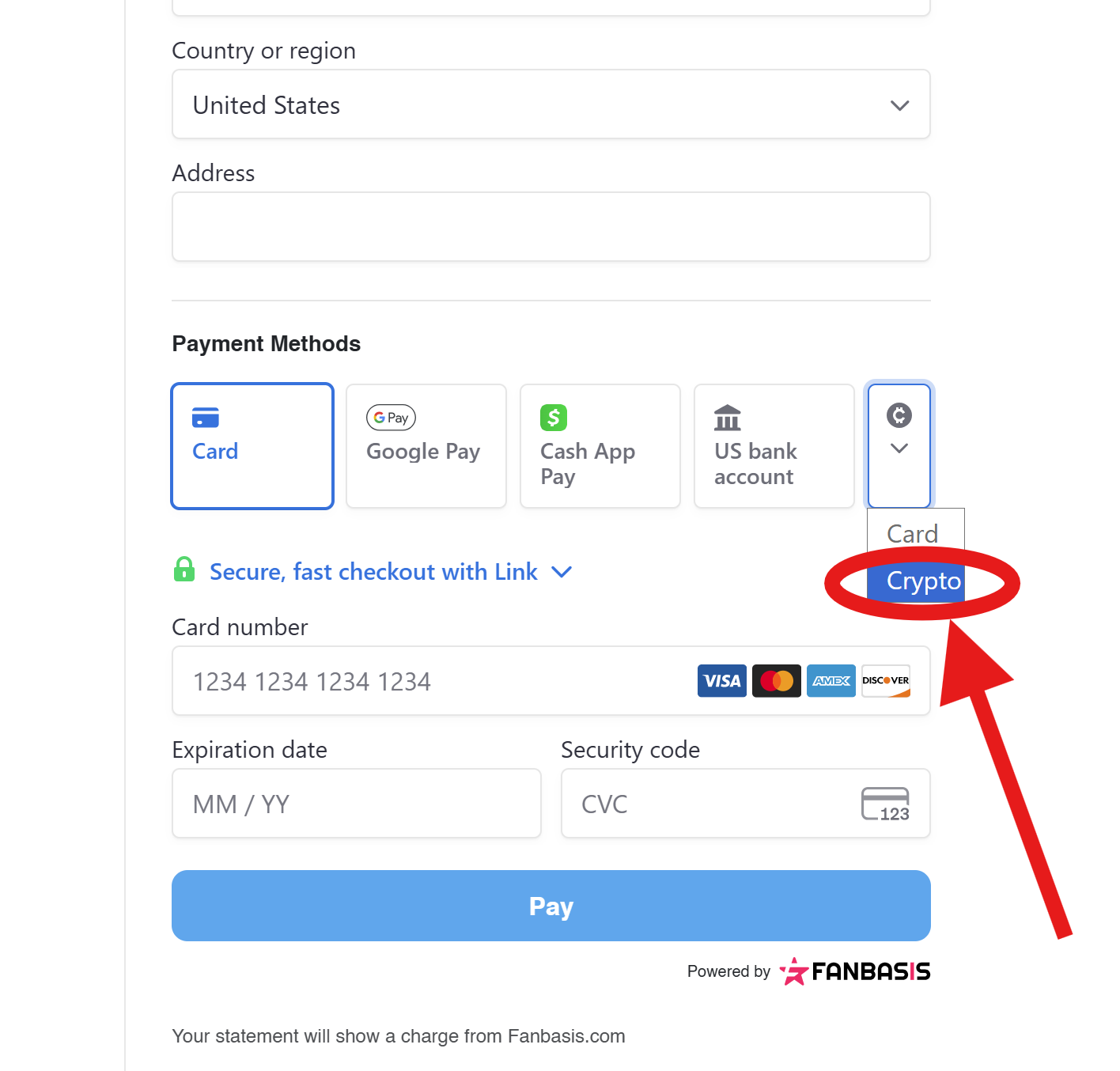
Select the credit card payment option at checkout to continue to the Fanbasis payment page. Once there, you can choose your preferred payment method:
Credit card
Cryptocurrency
If you wish to pay with cryptocurrency, select the crypto option on the Fanbasis page, as shown in the image below.
In some cases, the payment provider may request a brief identity verification. This is a secure process managed directly by the payment provider.
Sign the dxFeed Market Data Agreement
After your payment has been approved, you must complete and sign the dxFeed Market Data Agreement.
This agreement is required to activate your market data. Once it has been completed successfully, your account will be activated and ready to trade.
Join the Free Daily Competition
Once your account is active, you can subscribe to the Taurus Daily Competition at no additional cost.
The Daily Competition gives you the opportunity to earn Taurus Coins based on your position in the ranking. These coins can be redeemed for additional discounts on future purchases.
100 Taurus Coins = $1 USD
Complete Your Evaluation
If you selected FREES Safety, FREES Max, or PRIME, you must reach the applicable profit.
Once you have reached the profit target your Evaluation will be marked as successfully completed.
This step does not apply to DIRECT PRIME accounts, as they provide direct access to a Profit Account.
Activate Your Profit Account
After successfully completing your Evaluation, the activation conditions depend on the account type you selected:
FREES Safety — No Activation Fee
FREES Max — No Activation Fee
PRIME — One-Time Activation Fee of $119
There is no time limit for activating your Profit Account after completing the Evaluation. If you selected PRIME, you can pay the activation fee and activate your Profit Account whenever you are ready.
Choose Your Profit Account Options
During the activation process, you will be able to select additional options depending on your Profit Account type.
Increased Consistency Add-On
This option is available for eligible PRIME Profit Accounts. It increases the permitted consistency percentage.
The Increased Consistency Add-On must be selected during the Profit Account activation process and cannot be added afterward.
Profit Account Reset Add-On
This option must be selected during the Profit Account activation process and cannot be added afterward.
The Profit Account Reset Add-On is not available for DIRECT PRIME accounts.
Trade Your Profit Account
Once your Profit Account is active, you can begin trading and working toward your first payout.
Each Profit Account type has its own requirements. Depending on the selected product, these may include:
A minimum number of qualifying trading days
Minimum daily profit requirements
Consistency requirements
Cushion requirements
Minimum and maximum payout amounts
Eligible profit requirements
Make sure to review the complete payout rules for your specific account type before submitting a request.
Request Your Payouts
Once you have met all the requirements for your Profit Account, you can submit a payout request directly from your Taurus Dashboard.
Taurus applies an 85/15 profit split, which means the trader receives 85% of each approved payout.
Progress to a Live Trading Account
After demonstrating consistent profitability, responsible risk management, and a successful payout history, you may be selected to transition to a real trading account funded with live capital.
Traders selected for this stage enter a professional partnership with Taurus. The Risk and Compliance Team will contact eligible traders directly and guide them through the onboarding process and the applicable Live Account conditions.
Selection for a Live Account is based on an overall evaluation of the trader’s performance, consistency, and risk management. It is not determined exclusively by a fixed number of payouts.
Was this article helpful?
That’s Great!
Thank you for your feedback
Sorry! We couldn't be helpful
Thank you for your feedback
Feedback sent
We appreciate your effort and will try to fix the article